AI Home Design: Interior DecAI
- 4.7
- Rating
- 10.00M
- Installs
- Free
- Price

 Analysis by App-foxy
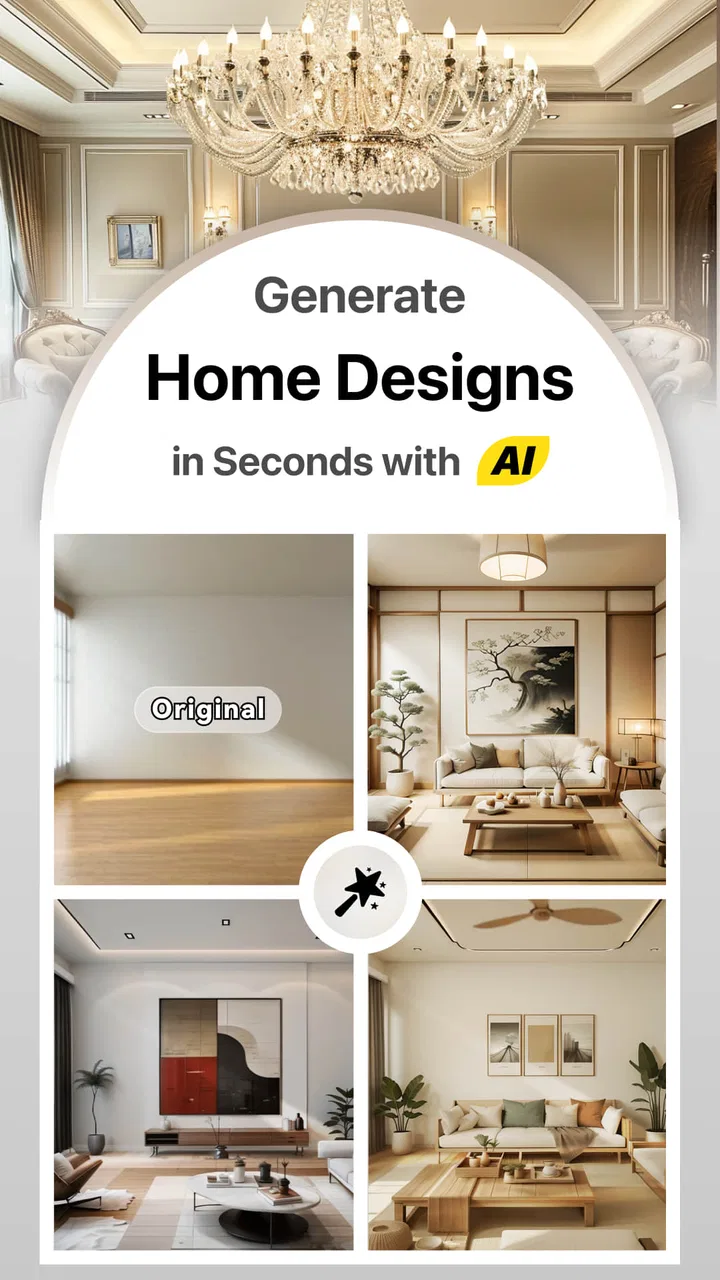
I tried AI Home Design: Interior DecAI with a practical question in mind: is it useful beyond the first few exciting room transformations, or does it become another app I open once and forget? As an art and design app from Smart AI DEV, it focuses on helping people imagine changes to their homes through AI-assisted visual design. The idea is easy to understand, and the first impression is appealing because it turns a vague decorating thought into something I can look at and discuss.
That distinction matters. This is not the same as buying furniture, drawing a measured floor plan, or producing construction documents. I see it more as a visual planning companion. It helps me explore a direction before committing time or money, especially when I know I want a different atmosphere but cannot yet describe the style clearly. For that purpose, it has a friendly entry point and a much lower learning curve than traditional interior-design software.
What the first week feels like
During the first week, the strongest appeal is speed. I can begin with an existing room and use the app to think in images rather than in abstract words. That is particularly helpful when I am comparing a calm neutral interior with something warmer, darker, brighter, or more decorative. Instead of trying to imagine the result from a furniture catalogue, I can use an AI-generated concept as a conversation starter.
You May Also Like

 Pandora - Music & Podcasts
Pandora’s Music Is Easy to Start, but Harder to Recover
Pandora’s strength is its low-effort path from a seed to a station. Its weak spot is how much confidence it asks you to place in connection, setup, and quiet recovery.

 8 Ball Pool
 Is Built on Rivalries, Rematches, and Routine
A close look at the rivalries, rematches, shared routines, and unanswered safety questions that turn a quick pool match into a persistent mobile community.

 Samsung Music
’s Quiet Strength Is Playing What You Already Own
Its reach comes less from spectacle than from dependable access to a personal library. That simplicity is both the app’s strongest retention engine and its ceiling.

 AccuWeather: Weather Radar
AccuWeather Review: A Quick, Clear Forecast for Everyday Decisions
For everyday plans, the best forecast is the one you can understand quickly. AccuWeather makes rain timing, radar, and local conditions easy to act on, with a few trade-offs.

 Hill Climb Racing
Why Hill Climb Racing Still Turns Crashes Into One More Run
A tiny car, a bumpy hill and one more upgrade: Hill Climb Racing keeps resurfacing because its simple chaos makes every near-miss feel personal.

 AliExpress - Shopping App
AliExpress Makes Global Shopping Feel Personal, but Shoppers Bear the Risk
AliExpress turns a global marketplace into a pocket-sized discovery engine. Its reach is useful, its shopping loop compelling, and its trade-offs easy to miss.
More From Our News Desk
View All News


I would recommend approaching each result as a suggestion, not a promise. AI design images are useful for mood, composition, and broad direction, but they should not be treated as a precise preview of how a particular sofa, paint colour, lamp, or cabinet will look in the real room. Lighting, proportions, materials, and the camera angle can make a concept feel more convincing than it is practical.
That is where the app works best for ordinary home decisions. Suppose I am preparing a spare room as a reading area. I may already know the room's size and where the door and window are, but I am unsure whether a compact chair, open shelving, or a small desk would create the better feeling. The app can help me compare visual moods before I start moving furniture around. I would still measure the space separately, but the generated ideas can prevent me from choosing a style that looks attractive in isolation and awkward in the room.
The app is also approachable for people who do not normally use design tools. Traditional room-planning software often asks me to understand grids, objects, dimensions, and technical controls before I see anything worthwhile. Interior DecAI is more immediately visual. That makes it suitable for a quick evening experiment, a renovation discussion with family, or a first attempt at defining what I actually like.
Its free price makes that initial exploration easy to justify, although in-app purchases range from $1.99 to $99.99 per item. I would pay attention to the purchase flow before treating it as a regular design tool. A free starting point is useful, but the long-term value depends on whether the free experience is enough for occasional planning or whether continued experimentation encourages repeated spending.
The app is marked for Everyone, which fits its accessible subject matter. The current version is 1.4.5, and it runs on Android starting with version 6.0. That broad compatibility is convenient if I am testing ideas on an older phone, though the quality of any visual workflow will still depend on the device and on how comfortable I am reviewing images on a smaller screen.
How I would use the results responsibly
My most useful habit was to separate inspiration from verification. First, I would use the app to identify a direction: perhaps a warmer living room, a more open-looking bedroom, or a cleaner home office. Then I would write down the elements that appear repeatedly in the concepts. Is it the wall colour, the amount of open space, the wood tone, the lighting, or the arrangement of seating that makes the image appealing? This turns an attractive picture into a practical design brief.
I would then check every important choice against the real room. Measure the walls, note the position of outlets and radiators, and check walking paths before ordering anything. AI can suggest a convincing arrangement without understanding the everyday obstruction created by a door swing, a narrow passage, or a piece of furniture that needs clearance. The best results come from using the app to decide what to investigate, not what to purchase blindly.
Another useful approach is to keep a small comparison set rather than generating endless variations. I would choose two or three directions and compare them using the same questions: can I maintain the proposed materials, does the layout suit how I live, and will the style still feel comfortable after the novelty disappears? This prevents the first week from turning into a stream of attractive but disconnected images.
The app can also help when several people have different tastes. One person may prefer minimal decoration while another wants colour and texture. A visual concept gives both sides something concrete to react to. It is easier to say “this feels too cold” or “the storage is not practical” when looking at a room than when discussing vague style labels. I found that kind of shared reference more valuable than simply browsing isolated furniture photos.
Does it keep earning attention month after month?
After the initial excitement, the value becomes more selective. I do not think this is an app I would open every day. Home design decisions are naturally occasional, and once a room has a settled plan, there may be little reason to keep generating alternatives. Its recurring value comes when my circumstances change: moving into a new home, refreshing a tired room, preparing a rental property, or reconsidering a space that never worked well.
That makes the app more useful as a project-based tool than as a permanent daily habit. I could return to it when planning a seasonal refresh or when a room needs a new purpose. A bedroom becoming a study, a dining corner becoming a work area, or an underused room becoming a guest space are the kinds of changes that justify reopening it. The app earns its place when it helps me make a decision I was genuinely stuck on.
There is also value in using it before speaking with a professional. If I am considering an interior designer, decorator, contractor, or furniture specialist, a few visual directions can make the first conversation more efficient. I can explain the atmosphere I want and identify the ideas I dislike before paying for detailed planning. I would not expect the app to replace professional advice for structural work, electrical changes, accessibility needs, or complex renovations, but it can improve the starting conversation.
For renters, the benefit is narrower but still real. I would focus on reversible ideas such as colour mood, lighting character, textiles, storage style, and furniture arrangement. The app may encourage a stronger visual direction without requiring permanent changes. For homeowners, it can support bigger decorating decisions, but I would still verify paint samples and material finishes in person because a generated image cannot reproduce every real-world surface accurately.
The rating of 4.7 from around 93 thousand ratings and more than 5 million installs suggests that the concept has reached a substantial audience. I would read that as evidence of broad appeal rather than proof that every design result will suit every room. People who enjoy visual experimentation are likely to get more from it than users who want exact measurements, a product catalogue, or a complete project-management system.
Where it differs from usual alternatives
The usual alternative is not always another AI app. Many people begin with image boards, social media collections, furniture retailers, or a conventional room planner. Those options have different strengths. Image boards are excellent for collecting references but can make it difficult to see how a style might translate into one specific room. Retailer planners are better when I already know the exact products I want, while technical design programs are stronger when dimensions and placement must be precise.
Interior DecAI sits between those approaches. It is more personal than a general inspiration board and less technical than a measured planning program. That middle position is its main advantage, but also its boundary. If I want a quick visual answer to “what direction could this room take?”, it is a sensible choice. If I need an accurate furniture fit, a renovation estimate, or a dependable inventory of purchasable objects, I would choose a more specialized alternative.
I would also avoid comparing its output directly with professional architectural visualization. The app is designed for accessible home design exploration, not for technical presentation. A professional may spend considerable time correcting proportions, materials, lighting, and construction details. The app's appeal is that I can explore possibilities without that level of effort, but the trade-off is that I must do more checking afterward.
The maintenance burden is mostly about judgment
Maintaining the app itself does not feel like the main challenge. The bigger burden is maintaining a sensible workflow. If I keep generating new designs without recording what I liked, the results quickly become a pile of disconnected ideas. I would save only the concepts that answer a real question and label them by room or purpose. That small discipline makes future visits more useful.
I would also keep a separate note beside the images with practical observations. For each promising concept, I might record the approximate furniture sizes I need, the changes that are reversible, the elements requiring professional advice, and the parts that are purely decorative. This prevents a beautiful concept from quietly becoming an unrealistic shopping list.
Another maintenance issue is expectation management. The more often I look at polished AI concepts, the easier it is to judge my actual home unfairly. Real rooms contain cables, storage needs, uneven light, daily clutter, and objects with personal meaning. I would use the app to improve a lived-in space, not to chase an image that removes everything inconvenient. The most successful plan is often the one that leaves room for normal life.
Because the app includes optional purchases, I would set a clear limit before using it repeatedly. Occasional users may find the free access sufficient for a single project, while enthusiastic users should decide whether additional experimentation genuinely improves a decision. Paying can be reasonable when a room project is important, but repeated purchases for tiny variations can become the least valuable part of the experience.
The developer, Smart AI DEV, presents a focused concept rather than a broad suite of home-management tools. That focus is helpful because the app is easy to understand, but it also means I would not expect it to become my central place for budgets, measurements, shopping, contractor coordination, or renovation records. I would pair it with a notes app, a measuring tool, and real product research rather than asking it to handle the entire project.
What may cause fatigue over time
The first source of fatigue is repetition. Once I have explored the main styles that interest me, more generations can begin to feel like small variations on the same idea. That is not necessarily a flaw in the app; it is a natural limit of a visual inspiration tool. The novelty fades when I stop making decisions and start browsing for its own sake.
The second is the gap between visual confidence and practical confidence. An image can look balanced while hiding questions about storage, cleaning, durability, comfort, and cost. I would be especially cautious with rooms that have demanding daily use, such as kitchens, family living areas, entryways, and children's spaces. A design that looks uncluttered may depend on storage that the image does not make obvious.
The third is the risk of style drift. If I use the app without a clear brief, I may collect a modern concept one day, a rustic concept the next, and a dramatic colour scheme after that. The variety is entertaining but not necessarily helpful. I found it better to begin each session with one constraint, such as “keep the existing floor,” “make the room easier to clean,” or “add storage without blocking light.” Constraints produce more useful exploration than unlimited inspiration.
Small-screen review can also be tiring when I am trying to inspect details. A room may look convincing at a glance but need closer attention before I can judge whether the arrangement makes sense. I would review important concepts on a larger screen when possible, then return to the phone for quick comparisons. The app is convenient for ideation, but convenience should not be confused with precision.
Users who want complete control may become frustrated for the opposite reason. A conventional design program gives me direct authority over dimensions, objects, and placement. An AI-led workflow is more like collaboration with an unpredictable visual assistant: it can offer an appealing direction, but I may not get exactly the adjustment I imagined. If my priority is exact control rather than creative prompting and exploration, another tool would likely be a better fit.
Who should use it and who should skip it
I would recommend it to someone who has a room they want to improve but lacks a clear starting point. It is also a good match for people who think visually, renters exploring reversible changes, homeowners comparing broad decorating directions, and anyone preparing for an initial design conversation. Beginners are likely to appreciate the low barrier more than experienced professionals who already have precise workflows.
I would skip it if I need a reliable scale drawing, a detailed bill of materials, exact product matching, or technical documentation. I would also skip it if I am looking for a one-time answer to a highly specific construction question. The app can support those projects at the inspiration stage, but it should not be the authority for decisions involving safety, structure, wiring, plumbing, or compliance.
It is less suitable for someone who dislikes iterative experimentation. The experience makes most sense when I am willing to compare ideas, reject attractive but impractical options, and refine a direction. If I want to enter measurements once and receive a finished plan with no further judgment, I would look elsewhere.
My long-term verdict
My lasting impression is positive, but measured. AI Home Design: Interior DecAI earns space on my phone when I have a real room decision to make, not because I expect it to become a daily habit. Its strength is turning uncertainty into visible options quickly. That is genuinely useful, especially before I spend money or commit to a decorating direction.
Its weakness is equally clear: the visual result is only the beginning of the work. I still need measurements, material checks, realistic budgets, maintenance thinking, and an understanding of how the room functions every day. The app is most valuable when I use it to ask better questions rather than to outsource judgment.
For a free art and design app with an Everyone age rating, it offers an approachable way to explore home ideas. The optional purchases mean I would use some restraint, particularly after the initial novelty fades. I would keep a small library of useful concepts, revisit the app when a room's purpose changes, and avoid endless variations that do not lead to an action.
In the end, I see it as a strong first step for visual home planning, not a replacement for a measured room planner or a professional. If you want help discovering a style, comparing moods, or explaining an idea to someone else, I think it is worth trying. If you need technical accuracy and complete control, choose a more specialized tool. Its recurring value depends less on generating more images and more on turning the right image into a practical, livable decision.
FAQs for AI Home Design: Interior DecAI
01What features does AI Home Design: Interior DecAI offer?
AI Home Design: Interior DecAI offers a range of features including virtual room visualization, furniture arrangement suggestions, and style recommendations. Users can upload photos of their spaces and receive AI-powered design ideas. The app also includes a color palette generator and a shopping list feature for recommended items.
02Is AI Home Design: Interior DecAI user-friendly for beginners?
Yes, AI Home Design: Interior DecAI is designed with a user-friendly interface that caters to both beginners and experienced designers. The app provides step-by-step guides and tutorials to help new users navigate its features effectively. Its intuitive design ensures a smooth experience from the start.
03What platforms is AI Home Design: Interior DecAI available on?
AI Home Design: Interior DecAI is available on both Android and iOS platforms. Users can download it from the Google Play Store for Android devices and the Apple App Store for iOS devices. Ensure your device meets the necessary system requirements for optimal performance.
04Does AI Home Design: Interior DecAI require an internet connection to function?
While some features of AI Home Design: Interior DecAI can be used offline, an internet connection is required for full functionality. Features such as AI-powered design suggestions and updates require connectivity. Ensure you have a stable internet connection to make the most of its capabilities.
05Are there any in-app purchases in AI Home Design: Interior DecAI?
Yes, AI Home Design: Interior DecAI offers in-app purchases. While the app provides a basic set of features for free, additional premium features and design packages can be purchased. These may include exclusive design templates, advanced AI tools, and ad-free experiences.
Pros
- User-friendly interface for all skill levels.
- Wide range of design templates available.
- Real-time AI suggestions enhance creativity.
- Supports both 2D and 3D visualizations.
- Seamless integration with smart home devices.
Cons
- Occasional lag with high-resolution renders.
- Limited free version features.
- Requires constant internet connection.
- Some design options feel repetitive.
- Subscription is relatively expensive.

AI Home Design: Interior DecAI
Gallery